The Government of Pakistan issues Computerized National Identity Cards through the National Database and Registration Authority (NADRA). As of recent official data, more than 120 million active CNICs exist in the national database. To help citizens verify identity details, block SIM misuse, and check record status, NADRA and Pakistan Telecommunication Authority (PTA) introduced official SMS services like 8009 and 8008. 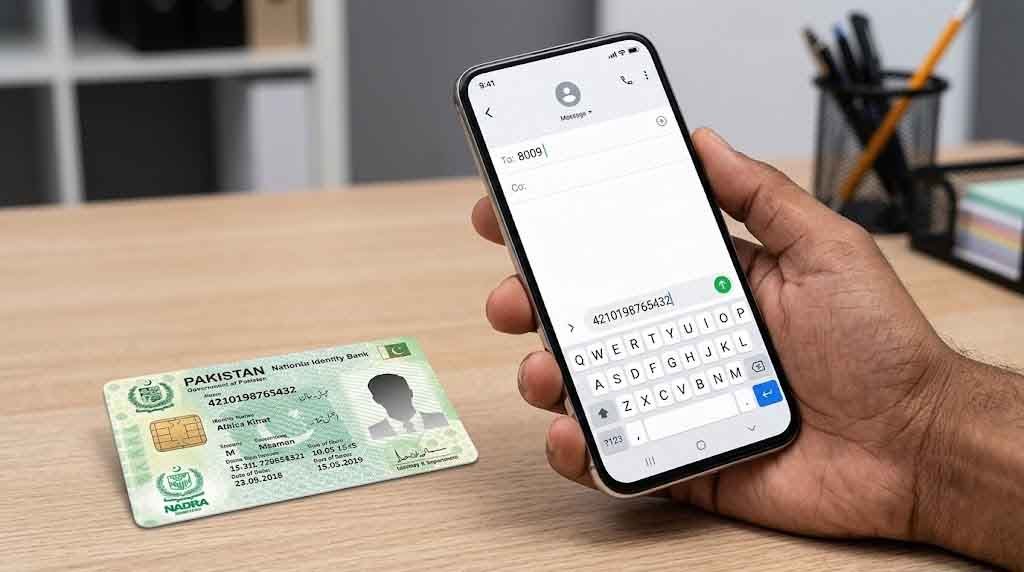
If you want to check CNIC with mobile number, you must use verified government channels. Below, I explain the exact methods, official codes, and what each service actually does.
What Is the Code 8009 for NADRA?
The short code 8009 is an official SMS verification service launched in collaboration with PTA and NADRA to confirm whether a SIM is registered against your CNIC.
Here is how it works:
- Open your mobile message app
- Type your 13-digit CNIC number (without dashes)
- Send it to 8009
- You will receive a reply listing the number of active SIMs issued against your CNIC
This service helps prevent SIM misuse and identity fraud. It does not show personal details of other individuals. It only shows how many SIMs are registered on your ID across telecom networks.
Standard SMS charges apply as per your mobile operator.
What Is 8008 NADRA?
The short code 8008 is linked with SIM verification services that allow you to confirm whether a specific mobile number is registered under your CNIC.
The process usually works like this:
- Type your CNIC number
- Send it to 8008
- The system replies with information regarding linked numbers
This service is particularly useful if you suspect unauthorized SIM registration. If you find unknown numbers attached to your CNIC, you should immediately visit the nearest franchise or PTA service center.
How to Check CNIC Status via SMS
If you applied for a new CNIC, renewal, modification, or Smart CNIC, you can check application status via SMS.
Here is the official method:
- Type your 13-digit tracking ID (provided on your NADRA receipt)
- Send it to 8400
You will receive a reply regarding processing status.
8400 works only for tracking applications, not for checking personal CNIC data.
Can I Check My CNIC Online?
Yes. NADRA provides online services through its official portal.
You can:
- Apply for a new CNIC
- Renew your CNIC
- Modify information
- Track application status
Visit the official NADRA online portal. You must create an account and verify identity through biometric or document upload.
NADRA does not allow public searching of CNIC details online. Any website claiming to provide full CNIC details by mobile number is unauthorized and unsafe.
Official CNIC SMS Codes Explained
Here is a clear breakdown of what each code does:
| Service Purpose | SMS Code | What You Send | What You Receive |
|---|---|---|---|
| SIM count against CNIC | 8009 | 13-digit CNIC | Total active SIMs |
| SIM verification | 8008 | 13-digit CNIC | Linked numbers info |
| CNIC application tracking | 8400 | Tracking ID | Status update |
Always use your own mobile number when checking. Avoid sharing your CNIC publicly.
Can You Check CNIC With Only a Mobile Number?
No. Officially, you cannot retrieve CNIC details using only a mobile number through public systems.
Here is the reality:
- NADRA protects identity data under privacy laws
- No legal portal allows reverse search of CNIC via mobile number
- Telecom operators also do not disclose CNIC information publicly
If someone claims they can find CNIC details from just a phone number online, it is either illegal access or misinformation.
Identity data is protected under Pakistani law.
How to Check CNIC Ownership of a SIM
To verify whether your SIM is properly registered:
- Dial *336# from your mobile (PTA SIM check service)
- Follow on-screen instructions
- You will see total SIMs registered under your CNIC
This service works across major networks in Pakistan.
If you exceed the legal SIM limit (currently 5 SIMs per CNIC under PTA regulations), you should deactivate unused numbers.
What to Do If You Find Unknown SIMs on Your CNIC
If 8009 or *336# shows numbers you do not recognize:
- Visit your mobile operator franchise
- Carry original CNIC
- Request biometric verification
- Block unauthorized SIMs immediately
Do not ignore unknown SIMs. Fraudsters often misuse stolen identity information.
Important Safety Warning
Never share:
- Full CNIC number publicly
- CNIC photo on social media
- SMS verification replies
Identity theft cases in Pakistan have increased with digital fraud. Always use official NADRA and PTA services only.
Frequently Asked Questions
What is the code 8009 for NADRA?
8009 verifies how many SIMs are registered against your CNIC.
Can I check my CNIC online?
Yes, but only your own record through official NADRA portal. Public CNIC search is not allowed.
What is 8008 NADRA?
8008 helps verify SIM linkage with your CNIC.
How to check CNIC status via SMS?
Send your tracking ID to 8400 to receive application status.
Final Practical Advice
If your goal is to check CNIC with mobile number, understand this clearly:
- You can verify SIMs linked to your CNIC
- You can track your CNIC application
- You cannot legally access someone else’s CNIC data
Always rely on official services from NADRA and PTA. Avoid third-party websites promising instant CNIC lookup.
Founder and Editor-in-Chief of Donpk.com with 10+ years of publishing experience. Oversees editorial accuracy, verifies official data, and leads coverage on government updates, prices, prize bonds, and public information.